

This page answers one question: what can I connect to NEQTO.ai? The short answer is “almost anything that can send JSON over MQTT, HTTPS, or WSS.” On top of that, NEQTO.ai natively understands a few specific gateway and sensor families, so they work with little or no payload shaping on your side. This page lists those families and the exact device profiles behind them, drawn from the platform’s parser and integration support.
neqtoai-std envelope is supported, even if it is not on any list below. See Endpoints & Devices for the payload format.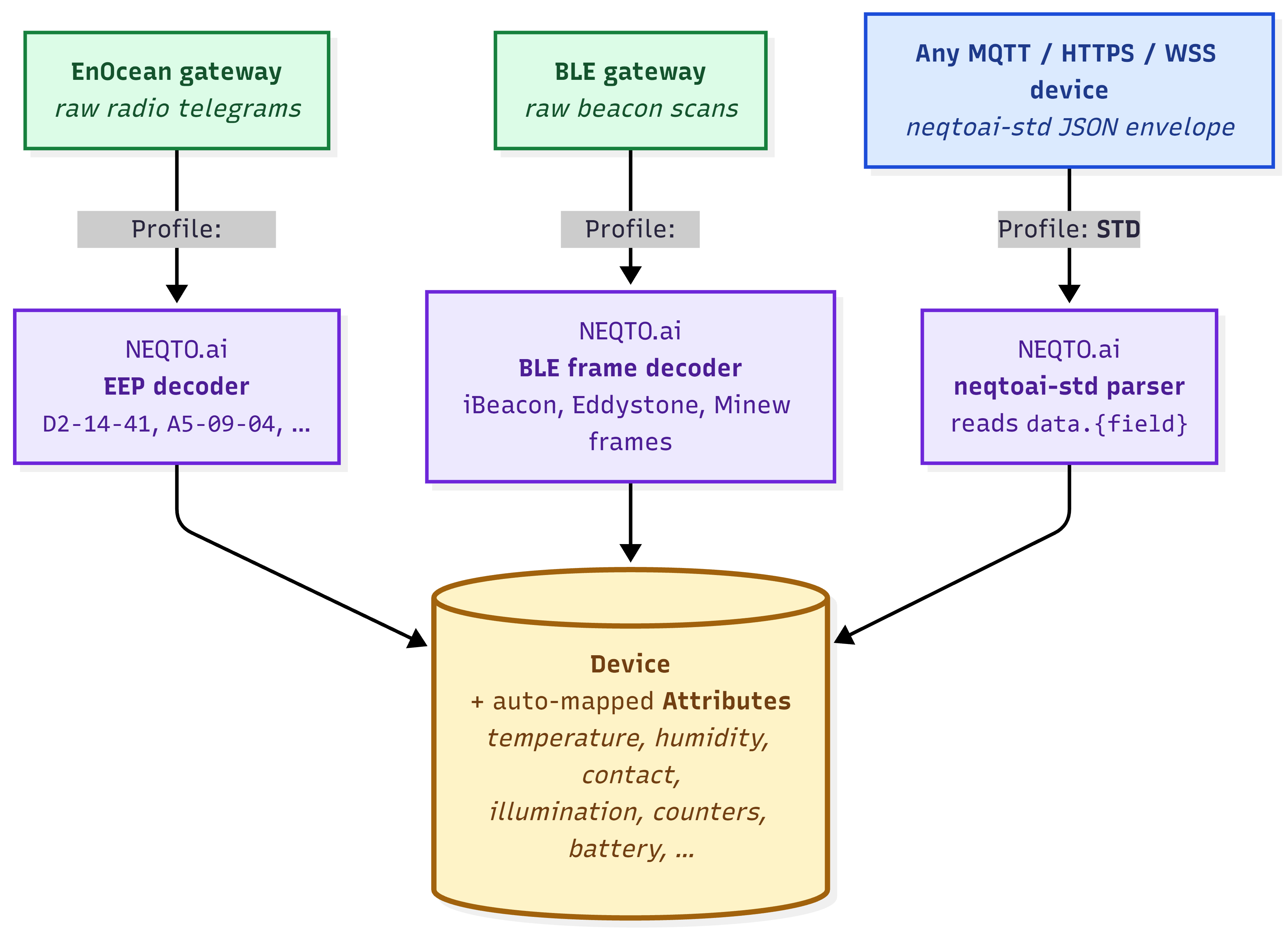
How NEQTO.ai Supports Devices
Every reading ends up in the same place: a Device with auto-mapped Attributes. What differs is how the raw data gets there. NEQTO.ai recognizes four kinds of inbound message and records the parser profile it matched.
| Profile | What it is | You send |
|---|---|---|
| STD | The generic, bring-your-own path. Anything that emits the neqtoai-std envelope. | The canonical JSON with payload_format: "neqtoai-std". |
| EnOcean | EnOcean radio telegrams, decoded by their EEP code into named readings. | A raw EnOcean gateway message, or the neqtoai-enocean JSON envelope wrapping the telegram (the platform decodes the hex either way). |
| BLE | Bluetooth Low Energy beacon scans relayed by a supported BLE gateway, decoded by frame type. | The gateway’s scan payload (the platform decodes the advertising frame). |
| ANY | Fallback for plain JSON that is neither neqtoai-std nor a recognized gateway shape. Stored field by field, best-effort. | Any JSON object. Less predictable than neqtoai-std; prefer the standard envelope. |
Supported Device Families
These are the gateway and sensor families represented by the current parser and integration support. Region codes (USA, Canada, EU, Japan) reflect the radio frequency of the EnOcean variant.
Gateways
A gateway is the bridge between your sensors and NEQTO.ai. BLE gateways relay beacon scans; EnOcean gateways relay radio telegrams.
| Protocol | Vendor | Product | Model | Region |
|---|---|---|---|---|
| BLE | Cassia Networks | Enterprise Bluetooth Gateway | E1000 | — |
| BLE | Minew | IoT Bluetooth Gateway | G1 | — |
| BLE | HPE Aruba Networking | 500 Series Campus Access Point (AOS8 & AOS10) | AP-505 | — |
| EnOcean | Pressac | Industrial Smart Gateway | INGW_902_E | USA, Canada |
| EnOcean | HPE Aruba Networking | 500 Series Campus Access Point (AOS8 & AOS10) | AP-505 (EG), with USB500U | USA, Canada, EU |
| EnOcean | HPE Aruba Networking | 500 Series Campus Access Point (AOS8 & AOS10) | AP-505 (JP), with USB500J | Japan |
| EnOcean | EnOcean | USB Gateway (Aruba AP option) | USB500U / USB500J | USA / Japan |
BLE IoT devices
These beacon-style sensors match the BLE frame support above. Their measurements arrive after the gateway relays the scan.
| Vendor | Product | Model | Typical data |
|---|---|---|---|
| Minew | Temperature and Humidity Sensor | S1 | Temperature, humidity |
| Minew | Smart Emergency Button | B10 | Button press, beacon ID |
| Minew | Card Beacon | C10 | Beacon ID, RSSI |
| Minew | Rechargeable Badge | MWC01 | Beacon ID, RSSI |
| Minew | Paper-battery Asset Tag | MTB02 | Beacon ID, RSSI |
| Minew | Pallet Beacon | MBS01 | Beacon ID, RSSI |
| Minew | Door Sensor | S4 | Contact (open/close) |
| OKABE Marking Systems | Temperature and Humidity Sensor Beacon | BLE-TM530 | Temperature, humidity |
| OKABE Marking Systems | Accelerometer Beacon | BLE-TM511 | Acceleration (X/Y/Z) |
Minew’s Millimeter Wave Radar Sensor (MSR01-A human presence, MSR01-B people-flow) is not represented in the current parser support and should not be treated as supported yet.
EnOcean IoT devices
These are EnOcean radio sensors represented by the current EEP support set. The EEP column is the profile NEQTO.ai decodes; a device may advertise several EEPs.
| Vendor | Product | Model | EEP(s) | Region |
|---|---|---|---|---|
| Pressac | CO2, Temperature & Humidity Sensor | 60_CO2_SLR_TMP_HUM_902 | A5-09-04 | USA, Canada |
| Pressac | Three-Channel CT Clamp | CTV3_928_3CH_060A | D2-32-00, D2-32-02 | Japan |
| Pressac | Door and Window Sensor | MS_DOOR_WIN_BAT_902 / _928 | D5-00-01 | USA, Canada / Japan |
| EnOcean GmbH | Multisensor Module | STM550U / STM550J | D2-14-41 (default); also D2-14-40, A5-02-05, A5-04-01, A5-04-03, A5-06-02, A5-06-03, A5-14-05, D5-00-01 | USA, Canada / Japan |
| EnOcean GmbH | IoT Multisensor | EMSIU / EMSIJ | D2-14-41 (default); also D2-14-40, A5-02-05, A5-04-01, A5-04-03, A5-06-02, A5-06-03, A5-14-05, D5-00-01 | USA, Canada / Japan |
| EnOcean GmbH | Motion Detector with Illumination Sensor | EMDCU | A5-07-03, A5-07-01, A5-08-01, A5-08-02, A5-08-03 | USA, Canada |
| OPTEX | Occupancy Sensor | CPD-J (WH) | A5-07-01 | Japan |
PLC
Industrial controllers connect over Ethernet using MQTT and the generic neqtoai-std path.
| Vendor | Product | Model | Note |
|---|---|---|---|
| Mitsubishi | MELSEC iQ-F Series | FX5U | Requires the FX5U-ENET Ethernet module for MQTT communication. |
Native EnOcean Support
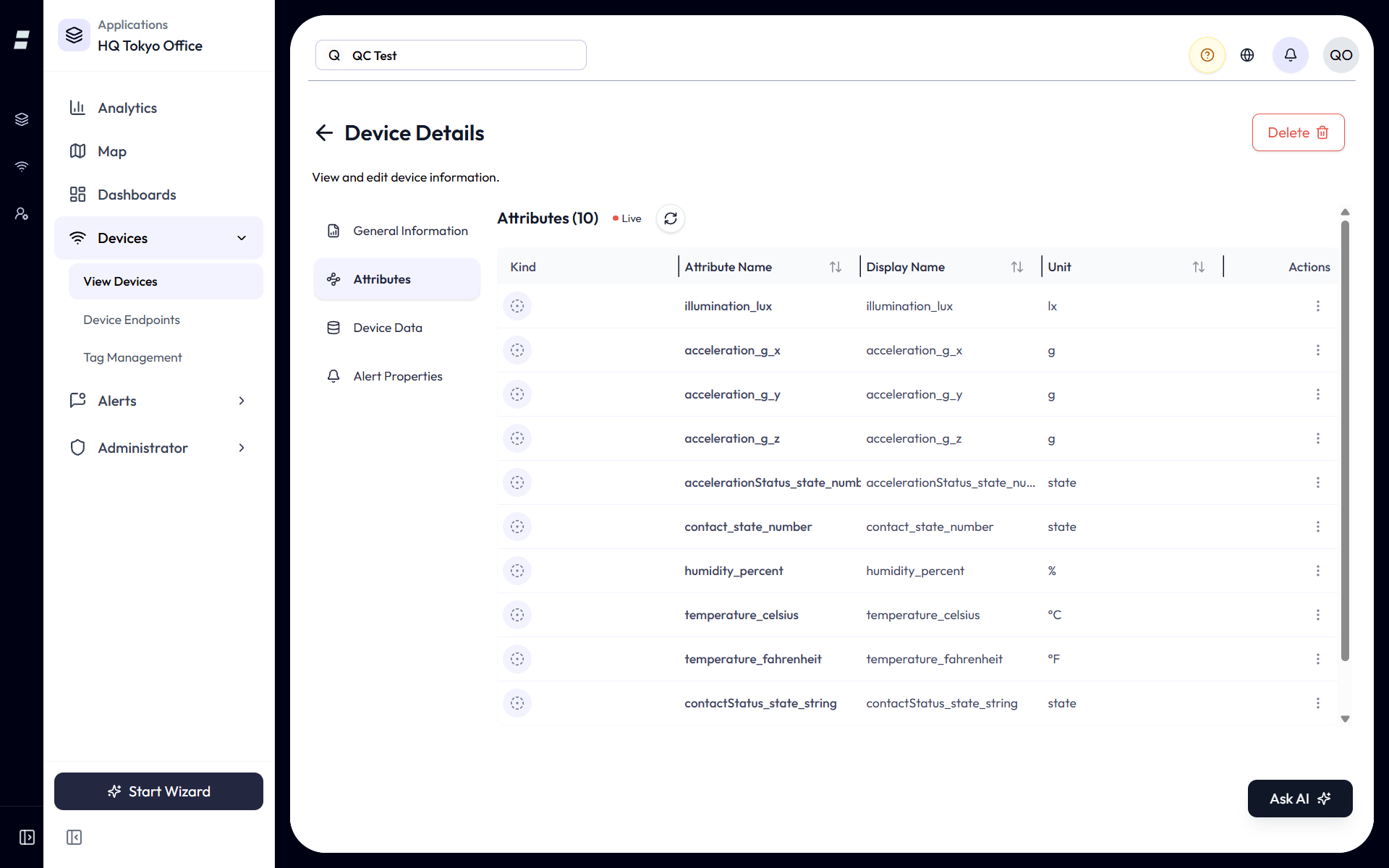
When an EnOcean gateway forwards a radio telegram, NEQTO.ai decodes it by its EnOcean Equipment Profile (EEP) and produces named readings, so you do not parse hex yourself. The platform ships decoders for a large set of EEPs.
neqtoai-enocean JSON envelope and send it over MQTT, HTTPS, or WSS — useful for a bridge or gateway that speaks JSON but not a vendor-specific protocol. Either way, NEQTO.ai decodes the telegram by its EEP.The neqtoai-enocean envelope carries the raw telegram as a hex string:
{
  "payload_format": "neqtoai-enocean",
  "timestamp": 1716806400000,
  "data": "55..."
}
The data field is the raw EnOcean packet in hexadecimal; timestamp is optional (the message’s arrival time is used if it is omitted).
F6 family of rockers, switches, and simple push-buttons and contacts — have no teach-in step. NEQTO.ai registers them automatically on their first telegram, so their readings start flowing with no teach-in required.The EEPs below are commonly used supported profiles from the current parser support set. The parser includes additional EEP implementations beyond this table.
| EEP | Description / what it measures |
|---|---|
| A5-02-01 | Temperature sensor, -40°C to 0°C |
| A5-02-02 | Temperature sensor, -30°C to +10°C |
| A5-02-03 | Temperature sensor, -20°C to +20°C |
| A5-02-04 | Temperature sensor, -10°C to +30°C |
| A5-02-05 | Temperature sensor, 0°C to +40°C |
| A5-04-01 | Temperature 0°C to +40°C, humidity 0% to 100% |
| A5-04-03 | Temperature -20°C to +60°C, humidity (10-bit) 0% to 100% |
| A5-05-01 | Barometric sensor, 500 to 1150 hPa |
| A5-06-02 | Light sensor, 0 to 1,020 lx |
| A5-06-03 | Light sensor (10-bit), 0 to 1,000 lx |
| A5-06-05 | Light sensor, 0 to 10,200 lx |
| A5-07-01 | Occupancy, supply voltage (optional) |
| A5-07-03 | Occupancy, supply voltage, light sensor |
| A5-08-01 | Light 0 to 510 lx, temperature 0°C to +51°C, occupancy button |
| A5-08-02 | Light 0 to 1,020 lx, temperature 0°C to +51°C, occupancy button |
| A5-08-03 | Light 0 to 1,530 lx, temperature -30°C to +50°C, occupancy button |
| A5-09-04 | CO2 sensor |
| A5-09-09 | Pure CO2 sensor, power-failure detection |
| A5-10-03 | Temperature sensor with set-point control |
| A5-12-00 | Automated meter reading: counter |
| A5-12-01 | Automated meter reading: electricity |
| A5-14-05 | Vibration / tilt, supply voltage |
| A5-20-01 | Battery-powered HVAC actuator (bidirectional) |
| A5-20-06 | Harvesting-powered actuator with local temperature offset (bidirectional) |
| A5-30-03 | 4 digital inputs, wake and temperature sensor |
| D2-05-00 | Blinds / roller-shutter control: position and angle feedback |
| D2-06-01 | Multi-function window handle: handle position, window tilt/contact, temperature, humidity, illumination, battery |
| D2-14-40 | Indoor temperature, humidity, XYZ acceleration, illumination |
| D2-14-41 | Indoor temperature, humidity, XYZ acceleration, illumination |
| D2-14-52 | Sound, pressure, illumination, presence and temperature |
| D2-14-53 | Leak detector |
| D2-14-58 | Temperature, humidity, particulate matter, sound level, illumination, CO2 and VOC |
| D2-14-59 | Temperature, humidity, PM, CO2, HCHO and TVOC |
| D2-14-5C | Temperature, humidity, particulate matter, CO2 and VOC |
| D2-14-5D | Temperature, humidity, sound level and illumination |
| D2-15-00 | People activity counter |
| D2-32-00 | A.C. current clamp, type 0x00 |
| D2-32-01 | A.C. current clamp, type 0x01 |
| D2-32-02 | A.C. current clamp, type 0x02 |
| D2-34-00 | Heating / temperature controller: temperature, set-point, operation mode, channel |
| D2-70-00 | Device status / diagnostics: uptime and error code |
| D2-B1-00 | Level sensor / dispenser |
| D5-00-01 | Single input contact (door / window) |
| F6-02-01 | Light and blind control, application style 1 |
| F6-02-02 | Light and blind control, application style 2 |
| F6-02-04 | Light and blind control, ERP2 |
| F6-05-01 | Liquid leakage sensor (mechanical harvester) |
Profile reference: the EnOcean Alliance EEP catalog at enocean-alliance.org/products/eeps/.
Native BLE Gateway Support
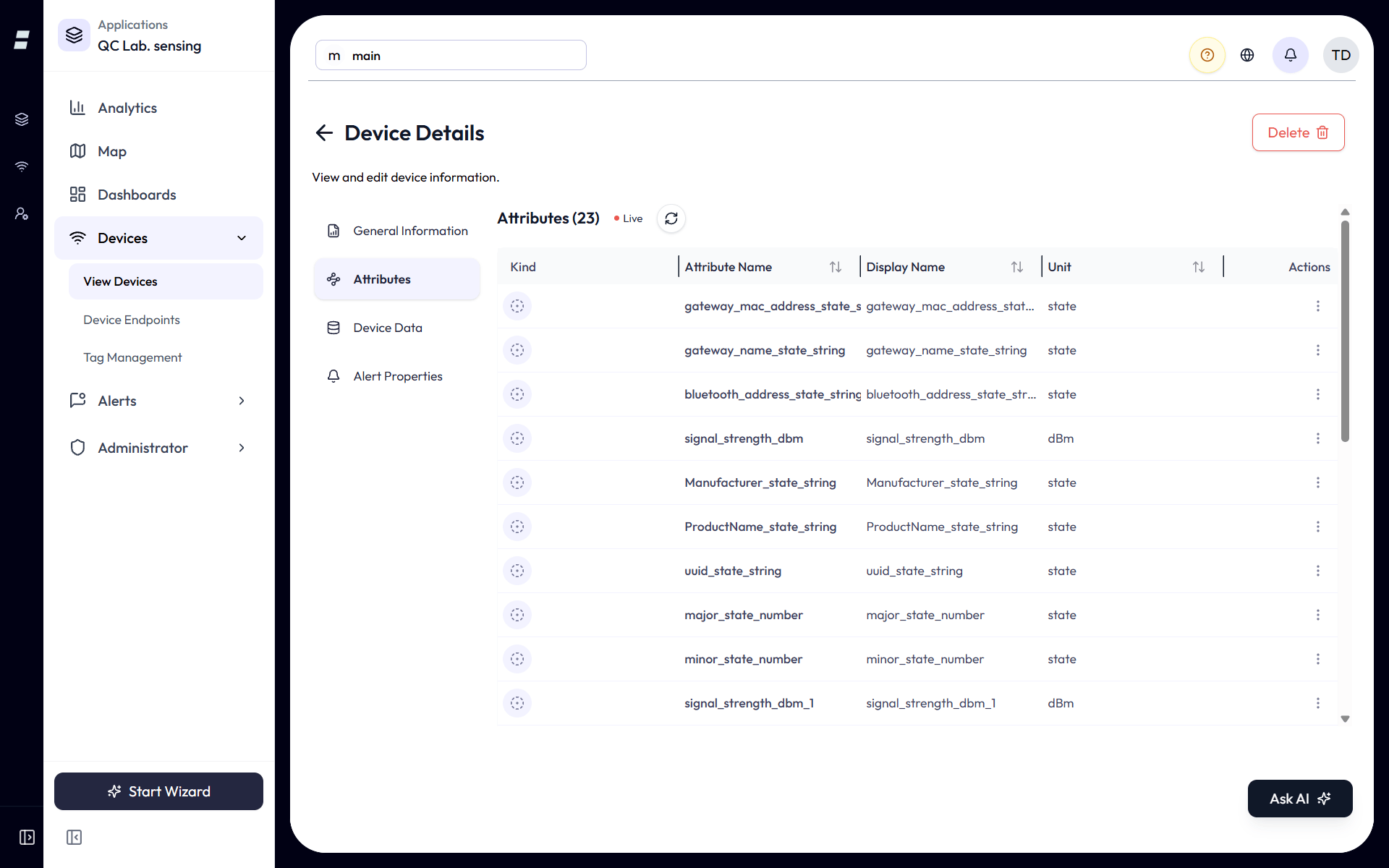
A BLE gateway listens for nearby Bluetooth Low Energy beacons and relays their advertising packets to NEQTO.ai. The platform decodes the beacon by its advertising frame type, so standard beacons and Minew sensors land as named readings with no payload shaping.
Each scan carries the beacon’s address (used as the device_id), its signal strength (RSSI), and the decoded frame contents. Like EnOcean, BLE support is receive only.
| Beacon format | Frame types decoded |
|---|---|
| Apple iBeacon | Apple iBeacon, Fake iBeacon Data |
| Eddystone | UID, URL, TLM |
| Minew | HT Data (humidity/temperature), TEMP Data, ACC-Axis Data, Light lux Data, Pressure Data, PIR Data, TVOC Data, Accelerometer and Gyroscope Data, Digital Pressure Data, 3-axis Magnetometer Data, Vibration Data, Photoresistance Data, Tamper Proof Data, Leakage Frame, Temperature and Humidity, DFU Advertising Payload, Device Info, Firmware information (Device information), Personnel traffic detection, Human Coordinate data, Self-learning result feedback, Label Frame Protocol, Temperature information, Door sensor block information, Configuration Advertising |
LoRaWAN Support
LoRaWAN devices connect through the generic neqtoai-std path. There is no native LoRaWAN decoder in the platform today, so a LoRaWAN device (or its network server) must forward decoded readings as a neqtoai-std JSON payload over MQTT, HTTPS, or WSS.
neqtoai-std. NEQTO.ai treats the result as a standard JSON device. A worked generic-payload example is the IMBuildings People Counter (IMB-PC-LW-V6), a battery-powered, bidirectional infrared people counter (LoRaWAN Class A). Its readings auto-map to Attributes: per-interval counts in each direction (counter_a, counter_b, integer count), cumulative totals (total_counter_a, total_counter_b, integer count), battery voltage (battery_voltage, V), and two status bitfields (device_status, sensor_status). Integration note: the cumulative totals are uint16 and wrap at 65,536 on the hardware, so callers that track lifetime counts must diff across uplinks rather than reading the absolute value.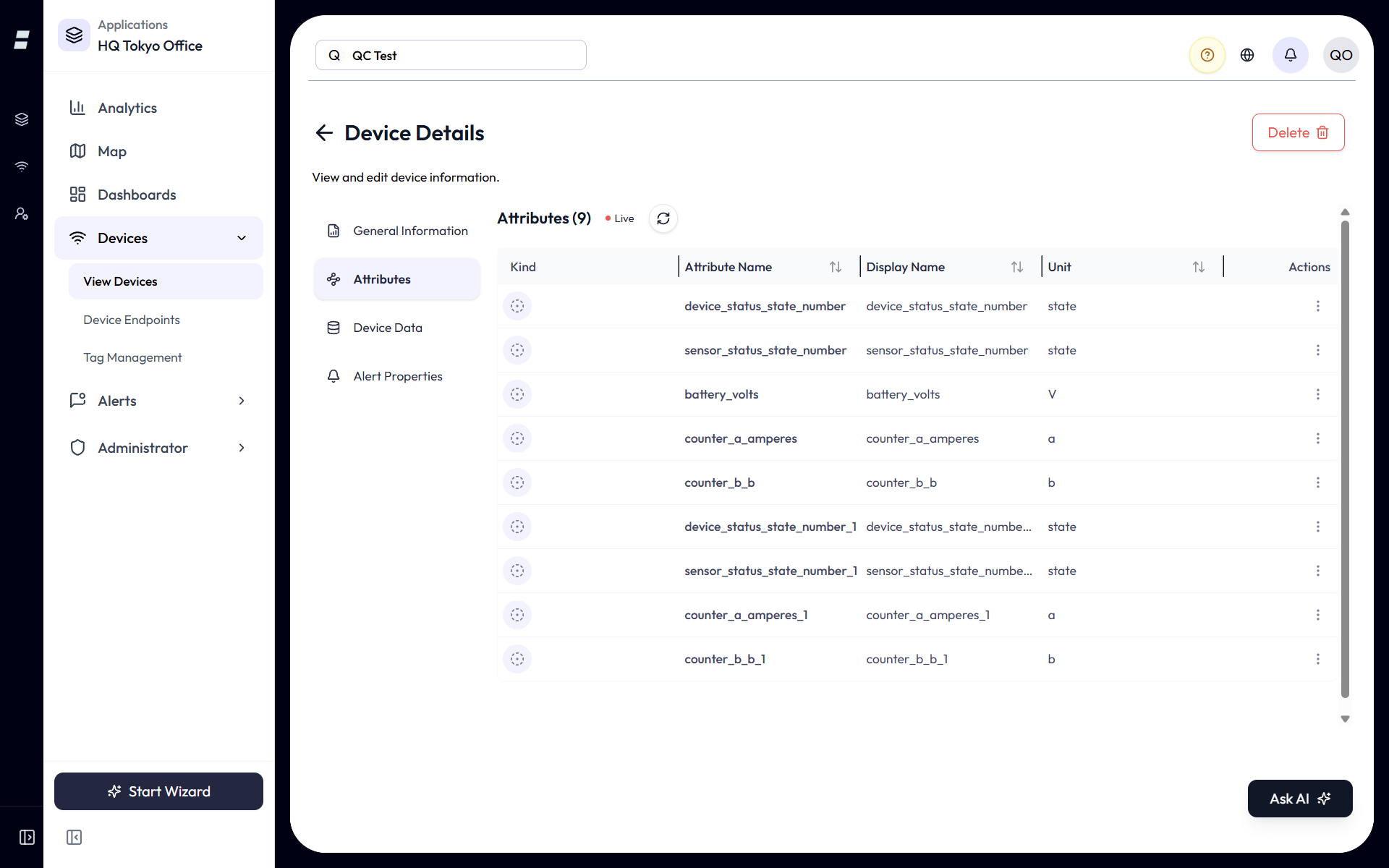
Anything Else: the Generic Path
If your device is not on any list above, it is very likely still supported. The rule is simple.
neqtoai-std JSON over MQTT, HTTPS, or WSS, it works. That covers custom firmware, microcontrollers, edge scripts, PLCs, LoRaWAN network servers, and cloud-to-cloud bridges. Readings auto-map to Attributes exactly as the native families do. Full payload spec, fields, and troubleshooting are in Endpoints & Devices.A minimal example, repeated here for convenience:
{
  "payload_format": "neqtoai-std",
  "timestamp": 1716806400000,
  "device_id": "my-device-01",
  "data": {
    "temperature": { "value": 22.4, "unit": "c" },
    "humidity":    { "value": 62.3, "unit": "%" }
  }
}What You Get After Ingestion
No matter the path, decoded readings become Attributes you can chart, alert on, and map. The common measurement kinds across the supported families:
| Measurement | Seen in | Typical unit |
|---|---|---|
| Temperature | EnOcean, BLE, generic | °C |
| Humidity | EnOcean, BLE, generic | % |
| Illumination | EnOcean, BLE | lx |
| Occupancy / PIR | EnOcean, BLE | state |
| Contact (open/close) | EnOcean, BLE | state |
| CO2 | EnOcean | ppm |
| Pressure | EnOcean, BLE | hPa |
| Energy / current | EnOcean (CT clamp) | A |
| Acceleration / vibration | EnOcean, BLE | g |
| People count | LoRaWAN (generic), EnOcean activity counter | count |
| Battery / supply voltage | EnOcean, BLE, LoRaWAN | V or % |
| Signal strength (RSSI) | BLE | dBm |
- Native means decoded for you. EnOcean telegrams and BLE scans arrive as raw bytes; NEQTO.ai turns them into the readings above.
- Receive only for native protocols. EnOcean and BLE support displays incoming data; it does not control or actuate devices.
- Everything else is bring-your-own JSON. Send
neqtoai-stdand you are supported, list or no list. - Regions matter for EnOcean. Pick the model that matches your radio region (902 MHz for USA/Canada, 868 MHz for EU, 928 MHz for Japan).