

Supported Devices
You can connect devices that send JSON over MQTT, HTTPS, or WSS. NEQTO.ai also parses several gateway and sensor families with little or no payload shaping. This page lists those families and the device profiles covered by the platform’s parser and integration support.
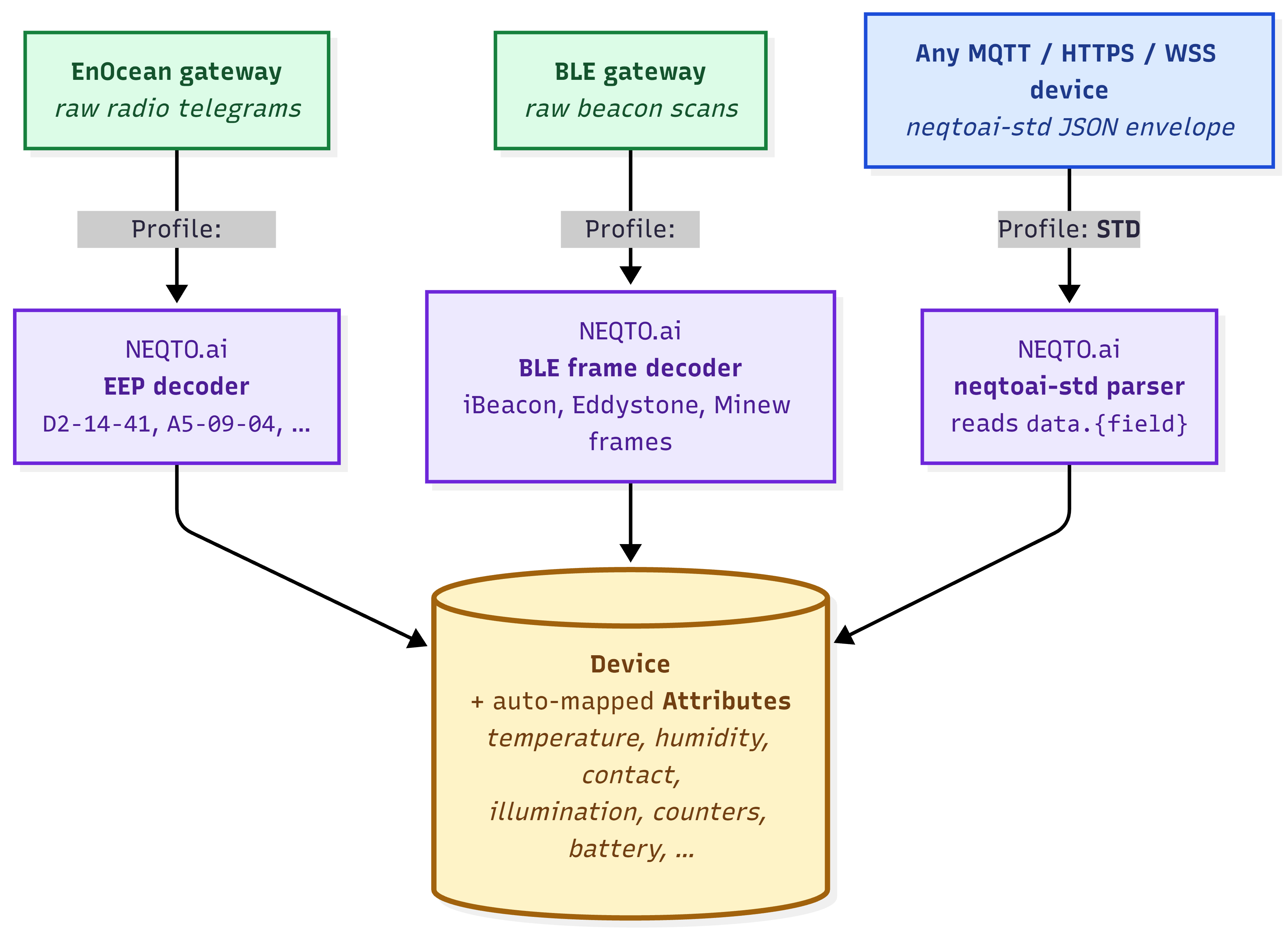
- Natively parsed. NEQTO.ai decodes the raw protocol for EnOcean radio telegrams and BLE gateway scans.
- Bring-your-own JSON. The platform accepts JSON readings over MQTT, HTTPS, or WSS from devices that are not listed below.
neqtoai-std is the recommended envelope, but the platform also accepts equivalent
payload shapes. See Endpoints & Devices for payload guidance.
How NEQTO.ai supports devices
Each path creates a Device with auto-mapped Attributes. The difference is how NEQTO.ai parses the incoming data. The platform recognizes four inbound message profiles and records the one it matches.
| Profile | What it is | You send |
|---|---|---|
| STD | The explicit standard path for the recommended neqtoai-std envelope. |
The standard JSON with payload_format: "neqtoai-std". |
| EnOcean | EnOcean radio telegrams, decoded by their EEP code into named readings. |
A raw EnOcean gateway message, or the neqtoai-enocean JSON envelope wrapping
the telegram (the platform decodes the hex either way).
|
| BLE | Bluetooth Low Energy beacon scans relayed by a supported BLE gateway, decoded by frame type. | The gateway’s scan payload (the platform decodes the advertising frame). |
| ANY |
Fallback for plain JSON that is neither neqtoai-std nor a recognized gateway
shape. The platform stores the object field by field on a best-effort basis.
|
Any supported JSON object or batch. Optional envelope aliases are normalized and readings
are discovered recursively under arbitrary object wrappers. Use
neqtoai-std when you control the payload.
|
Supported device families
These gateway and sensor families are covered by the current parser and integration support. For EnOcean devices, the USA, Canada, EU, and Japan region codes identify the radio-frequency variant.
Gateways
A gateway is the bridge between your sensors and NEQTO.ai. BLE gateways relay beacon scans; EnOcean gateways relay radio telegrams.
| Protocol | Vendor | Product | Model | Region |
|---|---|---|---|---|
| BLE | Cassia Networks | Enterprise Bluetooth Gateway | E1000 | — |
| BLE | Minew | IoT Bluetooth Gateway | G1 | — |
| BLE | HPE Aruba Networking | 500 Series Campus Access Point (AOS8 & AOS10) | AP-505 | — |
| EnOcean | Pressac | Industrial Smart Gateway | INGW_902_E | USA, Canada |
| EnOcean | HPE Aruba Networking | 500 Series Campus Access Point (AOS8 & AOS10) | AP-505 (EG), with USB500U | USA, Canada, EU |
| EnOcean | HPE Aruba Networking | 500 Series Campus Access Point (AOS8 & AOS10) | AP-505 (JP), with USB500J | Japan |
| EnOcean | EnOcean | USB Gateway (Aruba AP option) | USB500U / USB500J | USA / Japan |
BLE IoT devices
These beacon-style sensors match the BLE frame support above. Their measurements arrive after the gateway relays the scan.
| Vendor | Product | Model | Typical data |
|---|---|---|---|
| Minew | Temperature and Humidity Sensor | S1 | Temperature, humidity |
| Minew | Smart Emergency Button | B10 | Button press, beacon ID |
| Minew | Card Beacon | C10 | Beacon ID, RSSI |
| Minew | Rechargeable Badge | MWC01 | Beacon ID, RSSI |
| Minew | Paper-battery Asset Tag | MTB02 | Beacon ID, RSSI |
| Minew | Pallet Beacon | MBS01 | Beacon ID, RSSI |
| Minew | Door Sensor | S4 | Contact (open/close) |
| OKABE Marking Systems | Temperature and Humidity Sensor Beacon | BLE-TM530 | Temperature, humidity |
| OKABE Marking Systems | Accelerometer Beacon | BLE-TM511 | Acceleration (X/Y/Z) |
The current parser does not support Minew’s Millimeter Wave Radar Sensor models MSR01-A for human presence or MSR01-B for people flow.
EnOcean IoT devices
The current EEP support set covers these EnOcean radio sensors. The EEP column identifies the profile that NEQTO.ai decodes. A device may advertise several EEPs.
| Vendor | Product | Model | EEP(s) | Region |
|---|---|---|---|---|
| Pressac | CO2, Temperature & Humidity Sensor | 60_CO2_SLR_TMP_HUM_902 | A5-09-04 | USA, Canada |
| Pressac | Three-Channel CT Clamp | CTV3_928_3CH_060A | D2-32-00, D2-32-02 | Japan |
| Pressac | Door and Window Sensor | MS_DOOR_WIN_BAT_902 / _928 | D5-00-01 | USA, Canada / Japan |
| EnOcean GmbH | Multisensor Module | STM550U / STM550J | D2-14-41 (default); also D2-14-40, A5-02-05, A5-04-01, A5-04-03, A5-06-02, A5-06-03, A5-14-05, D5-00-01 | USA, Canada / Japan |
| EnOcean GmbH | IoT Multisensor | EMSIU / EMSIJ | D2-14-41 (default); also D2-14-40, A5-02-05, A5-04-01, A5-04-03, A5-06-02, A5-06-03, A5-14-05, D5-00-01 | USA, Canada / Japan |
| EnOcean GmbH | Motion Detector with Illumination Sensor | EMDCU | A5-07-03, A5-07-01, A5-08-01, A5-08-02, A5-08-03 | USA, Canada |
| OPTEX | Occupancy Sensor | CPD-J (WH) | A5-07-01 | Japan |
PLC
Industrial controllers connect over Ethernet using MQTT and the generic JSON path;
neqtoai-std is the recommended envelope.
| Vendor | Product | Model | Note |
|---|---|---|---|
| Mitsubishi | MELSEC iQ-F Series | FX5U | Requires the FX5U-ENET Ethernet module for MQTT communication. |
Native EnOcean support
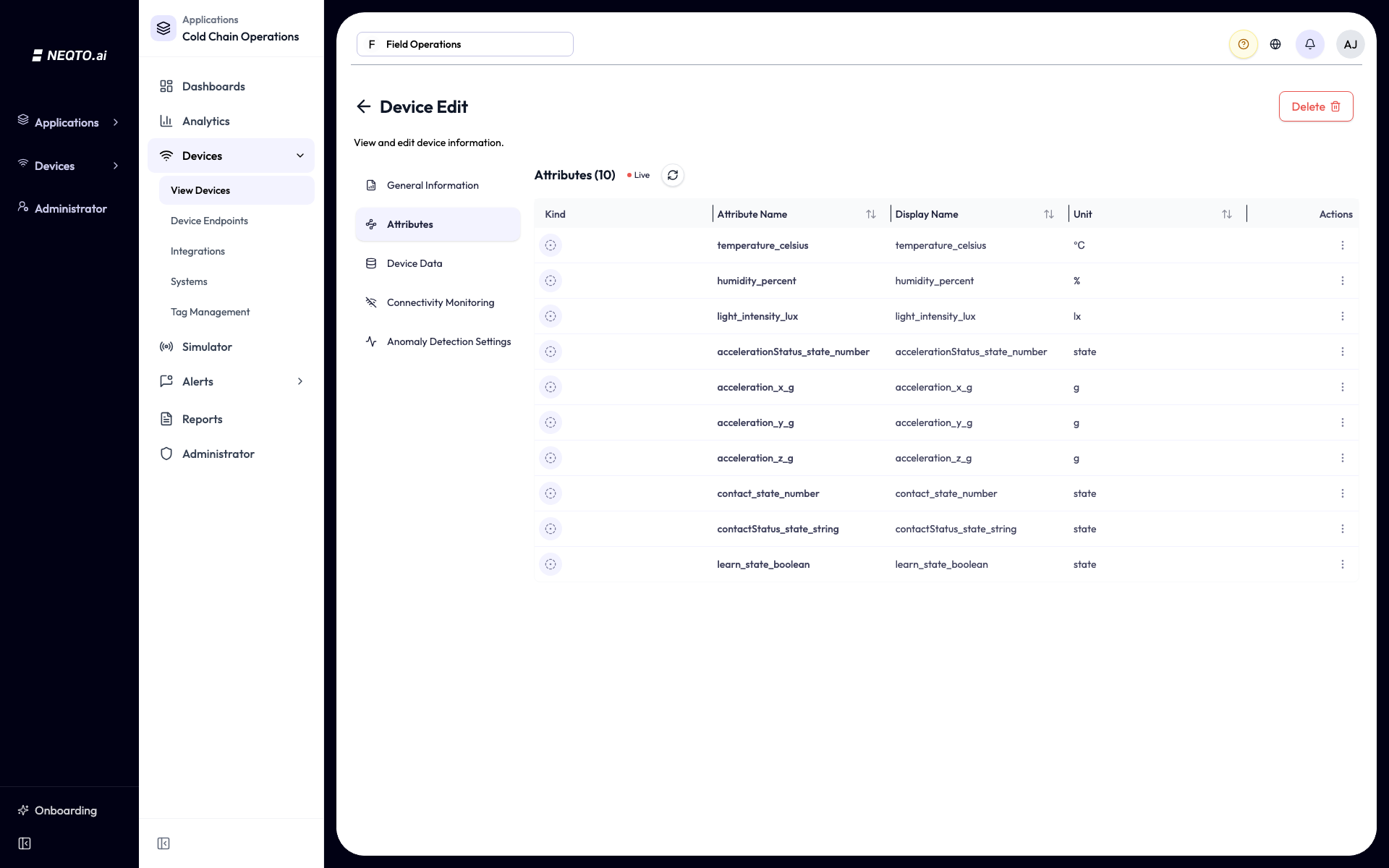
When an EnOcean gateway forwards a radio telegram, NEQTO.ai decodes it by its EnOcean Equipment Profile, or EEP, and produces named readings. You do not need to parse the hexadecimal data. The platform includes decoders for many EEPs.
neqtoai-enocean JSON envelope and send it over MQTT, HTTPS, or WSS. The second
option works for a bridge or gateway that sends JSON but does not use a vendor-specific
protocol. NEQTO.ai decodes the telegram by its EEP in either case.
The neqtoai-enocean envelope carries the raw telegram as a hex string:
{
  "payload_format": "neqtoai-enocean",
  "timestamp": 1716806400000,
  "data": "55..."
}
The data field is the raw EnOcean packet in hexadecimal. The
timestamp field is optional. If you omit it, the platform uses the message’s
arrival time. If you include it, send UTC. See
Endpoints & Devices.
F6 family include rockers, switches, simple push-buttons, and contacts. NEQTO.ai
registers them when it receives their first telegram, and their readings begin without a
teach-in step.
The table lists commonly used EEPs from the current parser support set. The parser also supports EEPs that are not listed here.
| EEP | Description / what it measures |
|---|---|
| A5-02-01 | Temperature sensor, -40°C to 0°C |
| A5-02-02 | Temperature sensor, -30°C to +10°C |
| A5-02-03 | Temperature sensor, -20°C to +20°C |
| A5-02-04 | Temperature sensor, -10°C to +30°C |
| A5-02-05 | Temperature sensor, 0°C to +40°C |
| A5-04-01 | Temperature 0°C to +40°C, humidity 0% to 100% |
| A5-04-03 | Temperature -20°C to +60°C, humidity (10-bit) 0% to 100% |
| A5-05-01 | Barometric sensor, 500 to 1150 hPa |
| A5-06-02 | Light sensor, 0 to 1,020 lx |
| A5-06-03 | Light sensor (10-bit), 0 to 1,000 lx |
| A5-06-05 | Light sensor, 0 to 10,200 lx |
| A5-07-01 | Occupancy, supply voltage (optional) |
| A5-07-03 | Occupancy, supply voltage, light sensor |
| A5-08-01 | Light 0 to 510 lx, temperature 0°C to +51°C, occupancy button |
| A5-08-02 | Light 0 to 1,020 lx, temperature 0°C to +51°C, occupancy button |
| A5-08-03 | Light 0 to 1,530 lx, temperature -30°C to +50°C, occupancy button |
| A5-09-04 | CO2 sensor |
| A5-09-09 | Pure CO2 sensor, power-failure detection |
| A5-10-03 | Temperature sensor with set-point control |
| A5-12-00 | Automated meter reading: counter |
| A5-12-01 | Automated meter reading: electricity |
| A5-14-05 | Vibration / tilt, supply voltage |
| A5-20-01 | Battery-powered HVAC actuator (bidirectional) |
| A5-20-06 | Harvesting-powered actuator with local temperature offset (bidirectional) |
| A5-30-03 | 4 digital inputs, wake and temperature sensor |
| D2-05-00 | Blinds / roller-shutter control: position and angle feedback |
| D2-06-01 | Multi-function window handle: handle position, window tilt/contact, temperature, humidity, illumination, battery |
| D2-14-40 | Indoor temperature, humidity, XYZ acceleration, illumination |
| D2-14-41 | Indoor temperature, humidity, XYZ acceleration, illumination |
| D2-14-52 | Sound, pressure, illumination, presence and temperature |
| D2-14-53 | Leak detector |
| D2-14-58 | Temperature, humidity, particulate matter, sound level, illumination, CO2 and VOC |
| D2-14-59 | Temperature, humidity, PM, CO2, HCHO and TVOC |
| D2-14-5C | Temperature, humidity, particulate matter, CO2 and VOC |
| D2-14-5D | Temperature, humidity, sound level and illumination |
| D2-15-00 | People activity counter |
| D2-32-00 | A.C. current clamp, type 0x00 |
| D2-32-01 | A.C. current clamp, type 0x01 |
| D2-32-02 | A.C. current clamp, type 0x02 |
| D2-34-00 | Heating / temperature controller: temperature, set-point, operation mode, channel |
| D2-70-00 | Device status / diagnostics: uptime and error code |
| D2-B1-00 | Level sensor / dispenser |
| D5-00-01 | Single input contact (door / window) |
| F6-02-01 | Light and blind control, application style 1 |
| F6-02-02 | Light and blind control, application style 2 |
| F6-02-04 | Light and blind control, ERP2 |
| F6-05-01 | Liquid leakage sensor (mechanical harvester) |
Profile reference: the EnOcean Alliance EEP catalog at
enocean-alliance.org/products/eeps/.
Native BLE gateway support
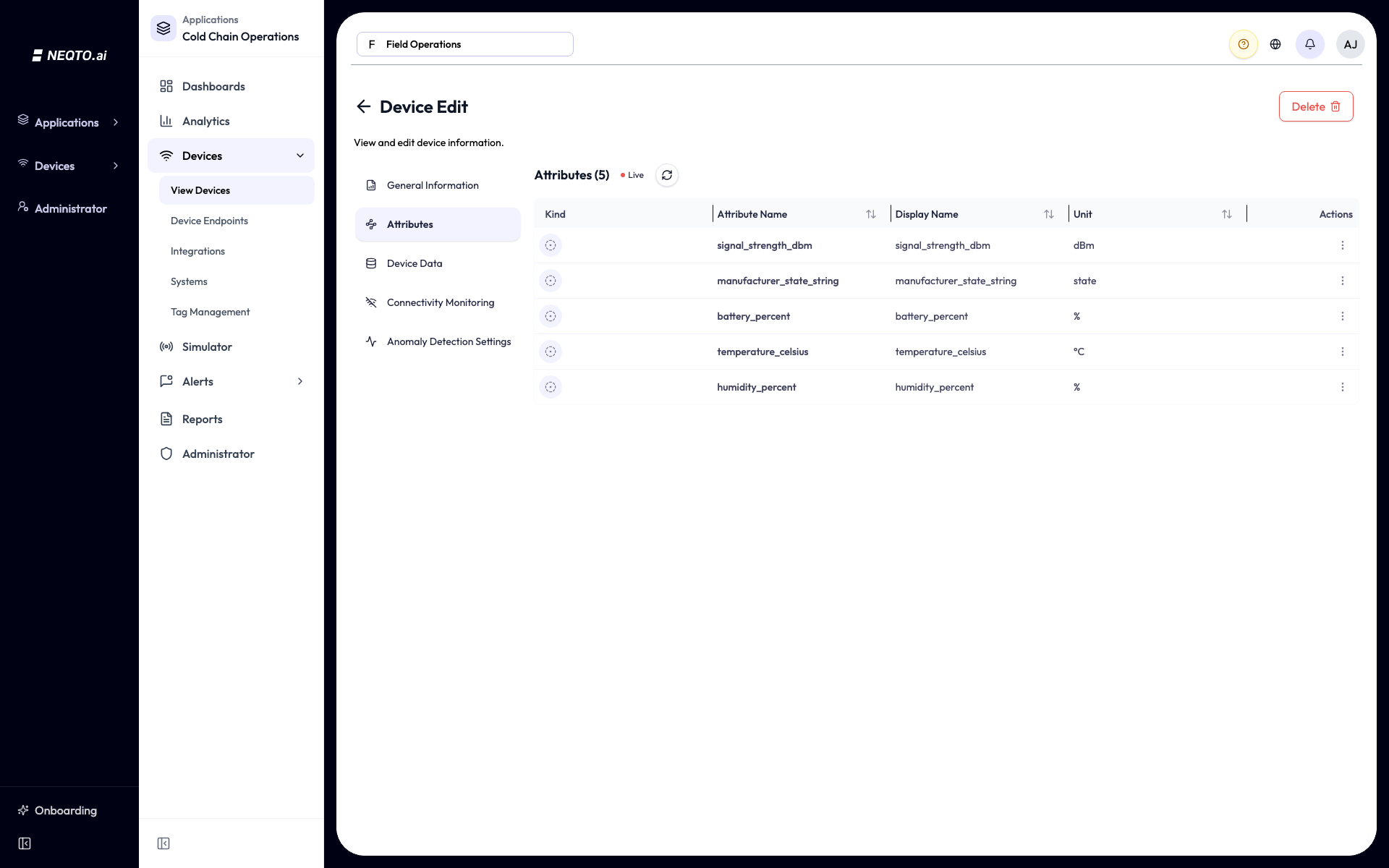
A BLE gateway listens for nearby Bluetooth Low Energy beacons and relays their advertising packets to NEQTO.ai. The platform uses the advertising frame type to decode standard beacons and Minew sensors into named readings. This path does not require payload shaping.
Each scan carries the beacon’s address, which becomes the device_id. It also
carries the signal strength, or RSSI, and the decoded frame contents. Like EnOcean, BLE support
is receive only.
| Beacon format | Frame types decoded |
|---|---|
| Apple iBeacon | Apple iBeacon, Fake iBeacon Data |
| Eddystone | UID, URL, TLM |
| Minew | HT Data (humidity/temperature), TEMP Data, ACC-Axis Data, Light lux Data, Pressure Data, PIR Data, TVOC Data, Accelerometer and Gyroscope Data, Digital Pressure Data, 3-axis Magnetometer Data, Vibration Data, Photoresistance Data, Tamper Proof Data, Leakage Frame, Temperature and Humidity, DFU Advertising Payload, Device Info, Firmware information (Device information), Personnel traffic detection, Human Coordinate data, Self-learning result feedback, Label Frame Protocol, Temperature information, Door sensor block information, Configuration Advertising |
LoRaWAN support
LoRaWAN devices connect through the generic JSON path. There is no native
LoRaWAN frame decoder in the platform today, so a LoRaWAN device or network server must forward
decoded readings over MQTT, HTTPS, or WSS. The recommended envelope is neqtoai-std.
The platform also accepts supported vendor topics and flexible decoded JSON shapes. See
Endpoints & Devices → MQTT topic options for the accepted shapes and limits.
LoRaWAN data flow. The LoRaWAN network server decodes the device frame and forwards the decoded fields. NEQTO.ai handles the result as a generic JSON device.
The IMBuildings People Counter, model IMB-PC-LW-V6, is a worked example that
uses the recommended neqtoai-std envelope. It is a battery-powered, bidirectional
infrared people counter that uses LoRaWAN Class A.
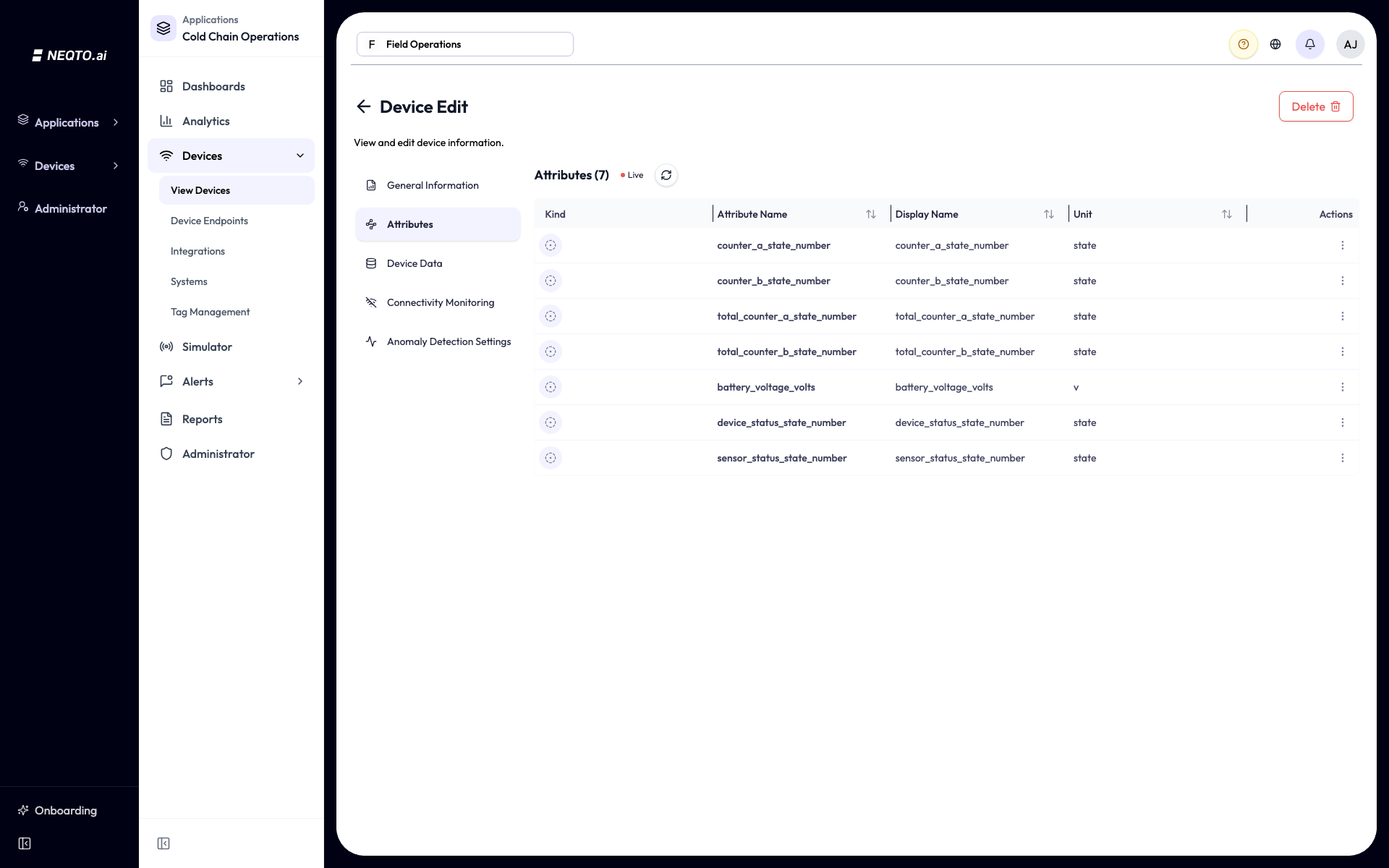
The counter sends counter_a and counter_b as integer counts for each
direction during the current interval, total_counter_a and
total_counter_b as cumulative integer counts, battery_voltage in
volts, and device_status and sensor_status as status bitfields. Each
field becomes an Attribute of its own, keeping the field name and gaining a suffix: the unit
where the reading has one, and a state suffix where it does not. In the figure below,
battery_voltage arrives as battery_voltage_volts, while the counters
and the two status fields carry no unit and arrive with _state_number.
The cumulative totals are uint16 values and wrap at 65,536 on the hardware. To track lifetime counts, calculate the difference across uplinks instead of reading the absolute value.
Other devices and the generic path
A device does not need to appear in the tables above to use the generic JSON path.
neqtoai-std is the recommended starting point, but the
platform also normalizes supported equivalent shapes. The readings auto-map to Attributes as
they do for native device families. See Endpoints & Devices for full payload
guidance and troubleshooting.
Recommended neqtoai-std payload:
{
  "payload_format": "neqtoai-std",
  "timestamp": 1716806400000,
  "device_id": "my-device-01",
  "data": {
    "temperature": { "value": 22.4, "unit": "c" },
    "humidity":    { "value": 62.3, "unit": "%" }
  }
}What you get after ingestion
Every path turns decoded readings into Attributes that you can chart, alert on, and map. The supported families commonly provide these measurements:
| Measurement | Seen in | Typical unit |
|---|---|---|
| Temperature | EnOcean, BLE, generic | °C |
| Humidity | EnOcean, BLE, generic | % |
| Illumination | EnOcean, BLE | lx |
| Occupancy / PIR | EnOcean, BLE | state |
| Contact (open/close) | EnOcean, BLE | state |
| CO2 | EnOcean | ppm |
| Pressure | EnOcean, BLE | hPa |
| Energy / current | EnOcean (CT clamp) | A |
| Acceleration / vibration | EnOcean, BLE | g |
| People count | LoRaWAN (generic), EnOcean activity counter | count |
| Battery / supply voltage | EnOcean, BLE, LoRaWAN | V or % |
| Signal strength (RSSI) | BLE | dBm |
- Native means decoded for you. EnOcean telegrams and BLE scans arrive as raw bytes. NEQTO.ai turns them into the readings above.
- Native protocol support is receive only. EnOcean and BLE support displays incoming data. It does not control or actuate devices.
-
Other devices use JSON. Use the recommended
neqtoai-stdenvelope or another supported JSON shape, whether or not the device appears in this page’s tables. - Regions matter for EnOcean. Pick the model that matches your radio region: 902 MHz for USA and Canada, 868 MHz for the EU, or 928 MHz for Japan.